An instance is one run of a campaign: Thursday’s table, a convention slot, or a second group in the same world. Invites, who is connected, and the transcript belong to that instance. The campaign’s NPCs, locations, and party stay shared.
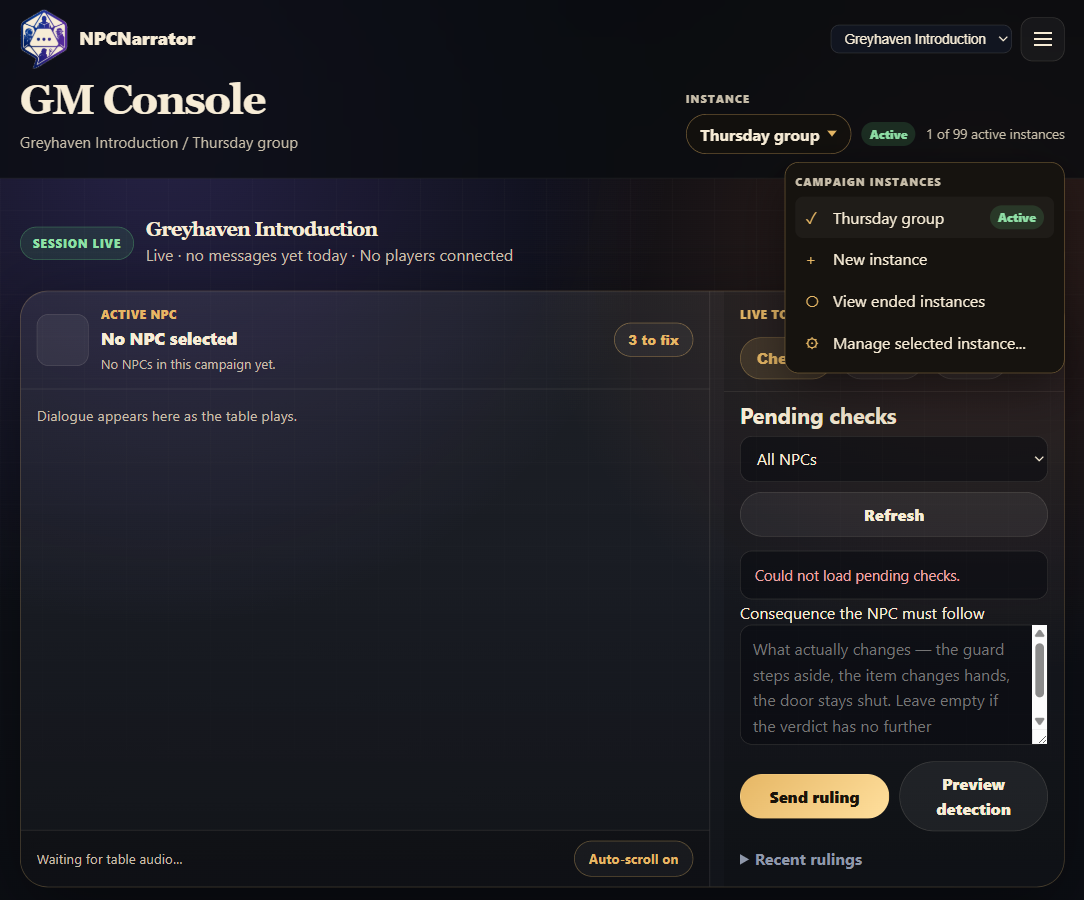
Open the console
- Choose the campaign in the header.
- Open GM Console.
- If nothing is selected, the page stays on Select an instance until you pick an open instance or click New instance.
The badge reads Active while the instance is open and Ended after you close it. An ended instance can still be opened to read its transcript. Live play needs an open one.
Create, switch, and end
- Open the Instance menu. The heading is Campaign instances.
- New instance asks for an Instance name (for example Thursday group), then Create instance.
- Click another row to switch. A check marks the one you are in.
- Manage selected instance... renames it, opens View transcript, or ends it.
- End this instance asks you to confirm. Keep instance leaves it open. Ending it stops new play on that run and keeps the history.
- View ended instances lists past runs. Search them, then open one to read what happened.
The menu also shows how many active instances the account is using. When you are at the limit, New instance stays disabled until you end one.
Player join codes are created on the instance you have open. A code from last month’s instance does not drop players into tonight’s run.