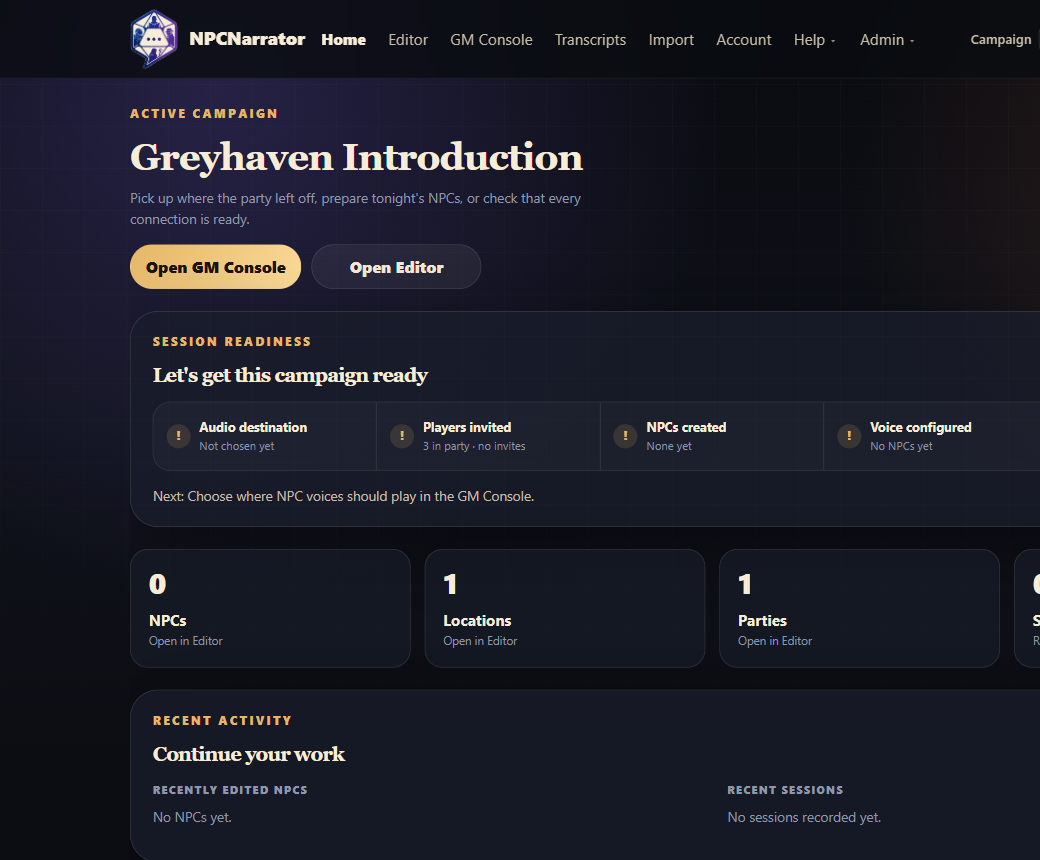
Campaign Home is the dashboard for the campaign selected in the header. It shows plan usage, whether the table is ready, and shortcuts into the Editor, GM Console, and transcripts.
First visit
With no campaign yet, Home says Bring your first NPC to life and offers Create your first campaign. That opens the Editor on the Campaigns folder. The three steps on that empty page are Name your campaign, Create your first NPC, and Invite the party.
Session readiness
Once a campaign exists, Session readiness shows how many of five checks are ready, a headline such as Let's get this campaign ready or Ready for the table, and a Next line that names the following action.
- Audio destination — where NPC voice will play. Set this in the GM Console.
- Players invited — the party exists and has join codes. See joining from a browser.
- NPCs created — at least one NPC is in the Editor.
- Voice configured — NPCs have voices. See voices and portraits.
- Table connected — Discord, Foundry, or a browser player is online.
A check that cannot be loaded shows Unavailable rather than zero. Fix the connection and reload Home.
Shortcuts
- Open GM Console and Open Editor use the campaign in the header.
- The NPCs, Locations, and Parties cards open that folder in the Editor.
- Sessions this month and Recent sessions open transcripts.
- Recently edited NPCs opens that NPC in the Editor.
Plan usage shows messages used this period and the renew date. Changing the header Campaign reloads Home for that world.